Showing posts with label raspberry pi. Show all posts

Thursday

New Raspberry Pi + nRF24L01+ shields

 New Raspberry Pi + nRF24L01+ shields

Connect PA+LNA modules to your Raspberry Pi

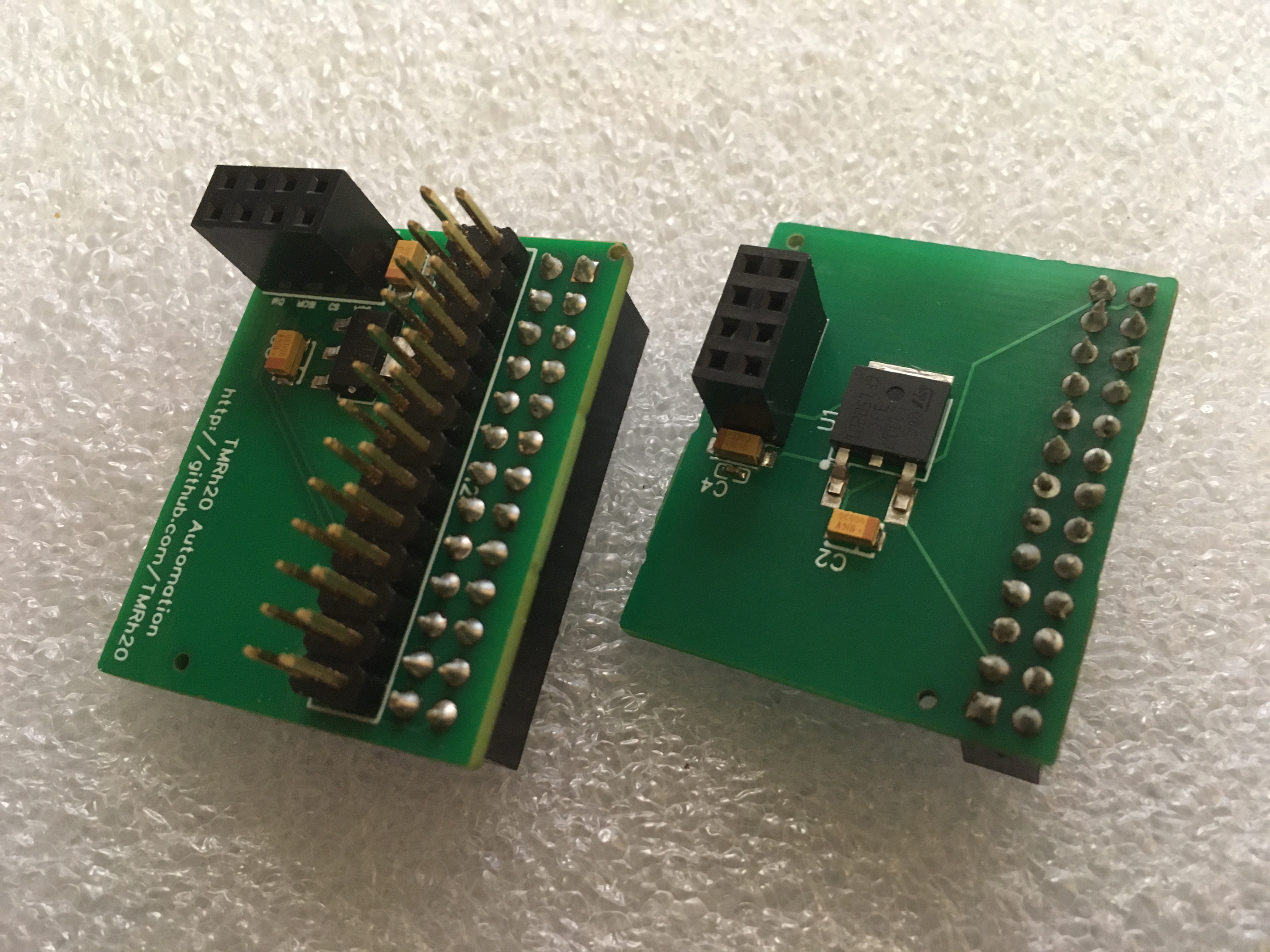
I recently had some circuit boards made, as I have had enough experience working with nrf24l01 radio modules that I've encountered numerous issues regarding power supplies and the need for additional capacitors soldered to the radios. 

These boards connect to the 5v pins of the Raspberry Pi, which can supply plenty of current for the radios, and converts it down to 3.3v. I've designed two boards, one that fits inside the case, and the other that fits outside the case, so they should work with most cases, though some cases may need modifications. The designs both use a 26-pin header, so they are compatible with earlier versions of Raspberry Pi as well.

Raspberry Pi - nRF24L01+ adapters

These adapters will support even the PA+LNA versions of the radios, so you can extend the range of your wireless networks considerably over the standard modules. They include extra capacitance, with capacitors placed right beside the VCC and GND pins of the radios, so there is no need to solder on additional capacitors.

Shields are available at https://tmrautomation.myshopify.com/

Friday

Summary: A Personal Experiment & A New Model for Open, Open-source, Anonymous & Secure Wireless Communication
Communication, Network, Protocol Design & Implementation Using Arduino & Raspberry Pi


Updated Nov 23, 2016

Over the course of the last few years, I have been working on a standardized, open-source communication stack that can be scaled from the biggest, most powerful devices, to tiny inexpensive devices like Arduino micro-controllers.

This looks familiar!

In the course of this time, I've made great progress in development of the core RF24 radio driver for nrf24l01+ radio modules. The overall goal of this project is independent of the radio devices, but these devices were chosen due to their relative capabilities vs cost, availability and ease of use. They are simply 2Mbps half-duplex wireless communication devices. Virtually any type of wireless devices can utilize the same theory of operation, including the mesh (RF24Mesh) style protocols.

What is it ? This system/communication stack allows nrf24l01+ radio/wireless devices to be utilized as a standard Network Interface Card (NIC) using TCP/IP & Mesh protocols. This is a summary of the experiment, system, general operation, and some of what I've learned.

Why? The programming, design and implementation of this system is part of a personal experiment I've been conducting involving the nature of wireless communication systems and protocols in relation to privacy, security, the Internet and the Internet of Things.

Theory of Operation & Design:


Consideration A: Open Networks + Anonymity + Automation


In general operation the basic principle of the communication stack is thus:
1. Each device utilizes a unique identifier while connected to a given access point.
2. This 'unique' identifier essentially represents an IP address in this implementation
3. For reasons of simplicity, this implementation also requires a 'static' identifier or IP address, but using more powerful micro-controllers and radio devices, the identifier can be assigned randomly or via DHCP
4. Devices simply attach, at any point in the network, using any available node(s) as an access point.

In a large scale model incorporating this type of design, with proper randomization of identifiers, individual devices and users are (potentially) indistinguishable from one-another initially and generally anonymous.

The next stage of course involves communication to enable the IoT/automation & allowing any capable device to connect. In this case there appear to be some options:

Option A: Leave the network open, and devices can choose to encrypt/authenticate their communications.This may require additional protective measures to prevent abuse in a large or publicly accessible system.

Option B: Assign selected devices a shared "network key" of sorts and incorporate encryption protocols into the network

Either way, it seems that wireless devices & users can inherently maintain their relative anonymity in a system that is designed a little differently.


Consideration B: Mesh Networks

The Network Layer: 
In studying the different layers involved in a capable communication stack, it seemed that many of the boundaries between layers were blurry, with many different systems 'breaking the rules' as it were. A good example of this is TCP/IP which does not strictly adhere to the OSI model.


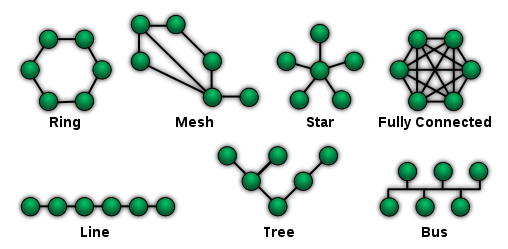
In my design, a 'static' network architecture is used, which resembles a tree configuration. The simplicity of the RF24Network layer means that each node can handle routing of any type of information, and only needs to know which nodes it is directly connected to. 

Some of the features/functionality involving the RF24Mesh layer have been placed into the RF24Network layer directly. The reasons are mainly due to efficiency and limitations of small devices and this is under review.

Due to the limitations of the specific device used ( nrf24l01+ ) radio modules, each device is limited to 5 individual connections in the mesh, but this could be easily extended for use with more powerful radio devices.

The Mesh Layer:


The mesh layer utilizes its knowledge of the 'static' network architecture to allow individual nodes to attach themselves to the network at any given point where another node is active.

As mentioned above, each device is currently pre-assigned a unique identifier from 0-255 due to the 8-bit nature of very small & low power devices. In a large scale or commercial implementation, these identifiers can be assigned automatically & randomly, with devices then registering themselves in DNS if required, or simply acting as an anonymous client.

The fundamental benefit of a mesh style network is that nodes will automatically adjust their physical address and connection as required as they move around the network or lose connectivity. Any other nodes will provide connectivity by allowing other nodes to attach, and routing or accepting their traffic according to specifications.

Per RF24Network design, there is very little overhead for individual nodes, since they only need to keep track of which node they are connected to, and which nodes are using them as an access point.

Consideration C: Limitations

There are currently a number of fundamental imitations and odd 'quirks' that have to be dealt with due to the nature of really small devices like 16Mhz AVR devices.

AVR Devices: The chosen limitations in this case include some of the smallest and least power hungry devices available to any consumer. ATTiny devices can operate as low layer nodes & relays using RF24Mesh, and slightly faster 328 based AVR devices can run an actual IP stack.

uIP TCP/IP Stack:  One of main issues with small devices involves certain limitations of the IP stack. As soon as slightly larger devices are utilized, more robust IP stacks are available that make operation faster and more reliable. uIP has provided a very interesting learning opportunity and is quite amazing given what it can do with extremely limited resources.

Radio Devices: nrf24l01+ radio modules are max 2Mbps half-duplex communication devices with a specific 5-byte addressing scheme.


Consideration D: Fully Automated Networks


Software and wireless development capabilities have come to the point of enabling fully autonomous networks that essentially manage themselves, devoid of human interaction. This goal has been partly realized or demonstrated in theory and action with the RF24Mesh layer, and could easily be built upon and implemented by large scale commercial interests.

The concept of independent networks that configure and maintain themselves may seem to some as a wild idea or a bit of a pipe dream, but we have all of the tools and capabilities within our grasp. It is simply a matter of engineering and development.

Connectivity of individual users can be managed entirely via authenticated and encrypted connections, so there is clearly no need for individual identification of users or user management beyond the application layer.

This type of system could allow communities to simply put up hardware and provide access. The system would be automated to the point that if a device fails, nearby devices send out an alert and the equipment is replaced. That is all.

Consideration E: Wireless Technology and Potential Breakthroughs


Communications technology, aka the Internet, has become ubiquitous in many ways to the daily life of millions and millions of individuals and businesses. Unfortunately, this type of connectivity has not been available to consumers in poor, rural or remote areas in a real, usable way.

Even with existing satellite technologies showing great promise towards providing quality communications capabilities to new places, it seems that additional measures will need to be taken to provide for the age of automation. This is the kind of automation that will see real-time control scenarios, with vehicles communicating among themselves, drawing in information from traffic control systems, news, weather, and countless other systems.  This is the kind of automation that will see drone based grocery and package delivery, combined with, at some point, flying vehicles and high speed transportation systems.

The implementation of automation on a massive scale is going to require something better than the kind of service we get from existing cellular networks and current technology. This is going to require a lot more than what public cellular, 5G and fiber technologies can provide. What we need moving forward is not just a standard step forward in communications technology, but a giant leap forward, while keeping in mind all the things that make the internet and technology beneficial to everybody.


General Summary:

It now seems entirely possible and practical to design and implement fully featured, autonomous. large scale, wireless network architecture that fundamentally provides anonymity and promotes privacy among its users, while providing full mesh networking capabilities and automated network management.

With the emerging nature of communications devices, potential breakthroughs in communication technology, and wireless/IoT/automation technology emerging as a major component of our future progress, it seems very important to study, understand and develop networking and communication technologies with us, the users in mind.

It also seems that wired communications systems have already become a thing of the past, with more and more devices embedding chips and features to support Wireless and WiFi protocols and interfaces. The importance of privacy and security is fundamental to the operation of any large or public communication system, and any large, public & worthwhile communication platform will incorporate these basic ideals as inherent to its operation.


http://nrf24.github.io/RF24Ethernet

http://nrf24.github.io/RF24Gateway

Wednesday

RF24 Addressing: A review of NRF24L01+ radio addressing
Pipes, Addresses and Acknowledegments


There still seems to be a fair bit of questions, misconceptions and misunderstandings regarding the nature of RF24 radio addressing and how to set up communication scenarios. This is a review of RF24 pipes, addressing and acknowledgements that should provide any user with enough information to set up any supported configuration.


Acknowledgements (ACKs):

The radios support an automatic acknowledgement feature, enabled by default, in which the receiving radio switches into transmit mode after reception, and acknowledges reception of data.

1. A sends to B
2. B responds to A
3. A is now aware that B received the payload successfully

The acknowledgment process is very important to understand, because correct addressing is required for this feature to function properly.


Simplest Explanation/Rules of Addressing (Using ESB/Auto-Ack):

1. When using Auto-Ack, every radio can utilize a maximum of 6 unique addresses at once, which other radios can send data to.

2. Each address is assigned to a logical "pipe", and each radio has only 6 pipes that can be assigned addresses.

3. Since auto-ack implies a bi-directional communication channel, each address/pipe can only support communication to a single radio using acknowledgements. If two or more devices send data to a single pipe/address, auto-ack should be disabled to prevent ACK spamming and erroneous acknowledgements.
   Exceptions:
   a: Disabling Auto-Ack - This prevents excessive spamming of acknowledgements and errant acknowledgement.
   b: Timing of Transmissions - Using a token-ring style network or other method of preventing simultaneous transmissions would allow multiple radios to send data to the same pipe/address while maintaining the reliability of acknowledgements.

Note: At 1MBPS, a transmission can take up to 85ms or so, and overlapping transmissions are likely with any significant traffic

4. Per manufacturer design, the addresses assigned to pipes 1-5 must be the same, except for a single byte.


Basic Scenario - One to One Communication with AutoAck:

For purposes of standardization and to allow the system to be scaled, it is generally recommended to use two radio addresses. With auto-ack disabled, a single address can be used for all radios, or groups of radios.


Code:
Radio #1:
byte address_1[] = {0xCC,0xCC,0xCC,0xCC,0xCC};
radio.openReadingPipe(1,address_1);
Radio #2:
byte address_2[] = {0xC3,0xCC,0xCC,0xCC,0xCC};
radio.openReadingPipe(1,address_2);


Process - Radio #1 sending to Radio #2:

1. Radio #1 opens pipe 0 for writing (and internally, reading) using address of Radio #2 (CCCCCCCCC3)
2. Radio #2 receives the data on the first attempt, and (internally) opens a writing pipe using its own address (CCCCCCCCC3) and sends an acknowledgement back to Radio #1
3. Radio #1 receives the ACK, so does not engage in a series of timed retries


Basic Scenario - One to One or Many to Many Communication with Multicast:

With AutoAck disabled, radios can share the same address, and the system can still be scaled to support any number of devices.

Code:
byte address_1[] = {0xCC,0xCC,0xCC,0xCC,0xCC};
radio.setAutoAck(0);
radio.openReadingPipe(1,address_1);

In this situation, any radio can send a message to all other radios sharing the same address:

Code:

radio.stopListening();
radio.openWritingPipe(address_1);
radio.write(&data,sizeof(data));
radio.startListening();


Simple Mesh Scenario - Five-to-Five Communication with AutoAck:


In the above scenario any radio can send or receive data from any other radio in the mesh, thus creating a 'true mesh' of 5 nodes.

Radio #1 will always open a writing pipe using the address assigned to pipe#1 of the recipient.
Radio #2 will always open a writing pipe using the address assigned to pipe#2 of the recipient.
Radio #3 will always open a writing pipe using the address assigned to pipe#3 of the recipient.
... and so on

Process Confusion:
In this example of addressing, if Radio#2 and Radio#3 were to both open a writing pipe to Radio#1 using the same pipe/address, there would be confusion with acknowledgements. Radio#1 will respond to both devices with acknowledgements, since they have both opened a writing and reading pipe using the same address.


Complex Network/Mesh Scenario - Many-to-Many Communication with AutoAck:


As can be seen, this format of addressing is very similar to creating sub-nets with IPV4 addressing, except here we are using HEX instead of decimals, and there are 5 bytes per address instead of 4. Each radio is linked as shown in the image below, and each radio has a unique communication channel (pipe/address combination) to use when communicating with any of its parent or child nodes.

Due to the correlation of addresses and associated topology, each radio only needs to be aware of its parent and child nodes. Any traffic sent to a given node will either be a: Accepted b: Routed to parent c: Routed to a child

Address configuration, routing etc, can be managed very simply by masking and bit-shifting.


In the above example, pipe0 is NOT assigned a reading address, leaving it available to be used for broadcast or multicast. With AutoAck disabled on a single pipe, or by using selective acknowledgements, all radios or groups of radios can share an address, thus all radios will receive all messages sent to that address.

See the RF24Network Documentation and Source Code for more information regarding this type of configuration.


Summary:

In many low-throughput situations, the radios will appear to function correctly even with improper addressing, and may not cause any obvious problems, however, performance and functionality will most certainly be affected.

In any situation where reliability and acknowledged payloads are important, proper addressing and an understanding of the underlying processes behind acknowledged payloads is very important.


Raspberry Pi/Linux with the nrf24l01+ & RF24Gateway
 A guide/example of advanced RF24/nrf24l01+ usage and monitoring on Linux devices

Overview:

There are many examples of basic RF24 usage, but not so many demonstrating complex communication scenarios and networking. The RF24 communication stack is free, with all development information, examples, code and documentation available on GitHub, designed with Arduino and RaspberryPi/Linux devices in mind.

The RF24 stack generally follows the OSI model, and provides a separate library for each layer, with efforts toward proper documentation for each layer. This allows any type of data/communication to pass over the radios, including TCP, UDP or any other protocol, and users can write their own code to link devices together using any layer(s).

So, what can we really do with these little radios?

The nature and low-cost of the system allows literally anybody with interest in wireless communication to setup, deploy, and experiment with small scale, self-healing wireless networks, or start writing their own code with the core RF24 driver, in a very short period of time.

The stack currently does not include sensor specific code or functionality, it is simply a communication stack which enables all kinds of different functionality.


Requirements, Hardware Setup & Installation:

1. A Raspberry Pi or Linux device a compatible radio device connected
    RPi Install Script

2. An Arduino device with a compatible radio device connected
    Arduino Install (Select RF24, RF24Network, RF24Mesh, RF24Ethernet libraries)

See the RF24 docs for hardware setup info & installation
Note: Please report any issues at https://github.com/TMRh20/RF24/issues

Demonstration and Information:

The video below demonstrates how to use RF24Gateway in general - Setting up nodes and communicating over RF24 using RF24Network, RF24Mesh, and standard protocols (ICMP, HTTP, SSH), along with monitoring

1. Config on RPi & Arduino devices
2. Complex mesh networks: How the different layers (RF24Network,RF24Mesh & RF24Ethernet) can be used with RF24Gateway
3. RF24Ethernet: Simple TCP/IP communication and web server running on Arduino over RF24
4. RF24Mesh: Node config & interaction with RF24Gateway
5. RF24Network: Node config & interaction with RF24Gateway
6. How to use WireShark to monitor user payloads with RF24Gateway and LUA Wireshark dissector script (using laptop w/SSH & X11 forwarding in this example)
7. How to configure Raspberry Pi as a standard node in an existing RF24Mesh
8. How to sniff RF24Network, RF24Mesh, and RF24Ethernet traffic using RF24Gateway & Wireshark(optional)
9. Tacos... oops they were already eaten, maybe next time


As shown in the video, any nodes running RF24Ethernet, RF24Mesh or RF24Network can be used with a master node running RF24Gateway, allowing users to try out or utilize the different layers quite easily.

RF24Ethernet: Provides TCP/IP communication. Very simple and reliable way to control on/off devices via a web browser or scripting. Has all functionality of lower layers.

RF24Mesh: Provides automatic (mesh) networking for RF24Network. RF24Mesh networks are self-healing and dynamic in nature.

RF24Network: Provides addressing, routing, fragmentation/reassembly of payloads via manual/statically defined wireless networks.

See the detailed overview and related pages at http://nrf24.github.io/RF24Ethernet


ENC28J60 Network Modules, Arduino and the Internet of Things (IoT):

An experiment, overview and analysis of TCP/IP networking with Arduino Ethernet

The module in question was sent to me by the friendly people at ICStation.com , in exchange for a review of the module itself.

Video Review:


ENC28J60 Mini Network Module:
http://www.icstation.com/images/big/productimages/4060/4060.JPG
  • 3.3V operation
  • Create a mini Arduino Web Server or Client
  • Plugs into your home router or modem just like a computer

    The uIP TCP/IP stack is software driven, while the ENC28J60 module handles the data mainly at the network (Ethernet) level. One main difference between UIPEthernet and the official Arduino Ethernet library is the need to keep the TCP/IP stack updated via software with the ENC28J60.

    Hardware: 

    The ENC28J60 was very easy to wire up, using the default SPI pins shown at http://arduino.cc/en/Reference/SPI along with the VCC and Ground pins.

    The device seems to work ok connected to the 3.3v output of the Arduino, but it seems best to use an external power supply or battery
    .

    Software:

    Two main libraries appear to be available: Ethercard and the UIPEthernet libraries. This post will focus on usage via UIPEthernet, since it shares a common API with the official Arduino Ethernet library.

    I am using the UIPEthernet library and examples found at: https://github.com/TMRh20/arduino_uip/tree/fix_errata12

    In attempting to utilize the modules and UIPEthernet for creating a simple webserver, I ran into a number of issues with data being sent or received incorrectly. Over a number of days, and benefiting from the information gained in building the RF24Ethernet library, I have been working to improve UIPEthernet, and also created some examples to demonstrate the issues and current usage.

    (A pull request has been made regarding these suggested changes to the main library)

    Overview of Library Changes (At the time of this post):
    Changes:
    • Introduce client.waitAvailable(); function  - Ensures the IP stack is processing incoming data while waiting for incoming data for a maximum defined duration in milliseconds: client.waitAvailable(3000);
    • Introduce Ethernet.update(); function - Allows user applications to ensure the IP stack is processing data while delaying or performing other tasks: Ethernet.update();
    • Perform additional processing of data while calling client.available();
    • Per testing, reduce max segment size (MSS) and the receive window to 511 bytes from 512 due to unidentified issue.
    • Reduce number of packets per socket to prevent data loss
    • Re-open the TCP window at timed intervals when data has not been sent or received on an open connection to prevent stalling during large downloads
    • Fix for outgoing data corruption
    • Force application to wait while writing data 
    • Better TCP window handling
    • Other minor changes, add examples
    Changes - Technical Summary:

    The first changes introduced added some new functionality, geared towards a software driven IP stack.  With the addition of additional processing and the Ethernet.update() function, the IP stack is more responsive to ICMP requests etc.

    The new examples included with my branch of the library clearly demonstrate some of the issues I encountered when attempting to create a simple web client and/or web server. The first issue I noticed involved the device crashing or stalling, and then failing to reconnect or respond to pings. Testing indicated that the hardware itself was still responding and receving packets, so the issue seemed to be software based. These issues mostly seem to be addressed in the fix_errata12 branch, but testing via large dowloads from a web server indicated there were still some remaining issues, mostly surrounding data corruption and flow control.

    Most of the remaining changes attempt to address issues with corrupted or out of sequence data, and to manage the flow of data better. In some situations, for example, web servers will send TCP payloads equal in size to 1/2 of the TCP Max Segment Size (MSS) which causes problems with flow control. The IP stack will now only close the TCP window if data is being received fast enought to do so, which appears to reduce issues with these transfers. The main issues come when a sending device sends only 1/2 MSS, and the recipient closes the window. The library will now count individual bytes in memory vs packets with data in them, and only close the TCP window if the assigned data buffers are completely full.

    Testing has been very successful, with the device demonstrating full functionality for extended periods of time, downloading 70+MB of data without any errors detected in the data or hardware. The new web server examples and HttpClientTest.ino example seem to be good displays of the current capabilities and error free operation, and can be used to demonstrate the issues, when used with the original library code, or when changes are reverted.

    Summary:
     
    The mini ENC28J60 modules are an inexpensive and effective way to add internet connectivity to any Arduino project, and their size make them very suitable for use with Arduino.

    I found the hardware itself to be very reliable and easy to use, although there seemed to be a few minor issues with the related Arduino library (UIPEthernet) that was tested.
    As noted, I have submitted some workarounds/fixes for review and possible integration into the main library at the time of this post, so users are encouraged to use the library linked above.

    ICStation.com:

    A big thank you to www.ICStation.com for sending me this product, as well as being very patient.

    It has been a number of months since I actually received it, but their small contribution has lead to the creation of the RF24Ethernet TCP/IP Radio Network library, and some potential improvements to the UIPEthernet library. A wealth of Arduino and Raspberry Pi related products, gizmos and devices are available on their website, and their staff seem very friendly.


    RF24Ethernet - For DIY Internet of Things and Home Sensor Networks
    Adding internet connectivity to RF24Networks using nrf24l01+ modules as ethernet cards

    RF24Ethernet, What is it and how does it work?

    For anybody not familiar with my blog, I have done a lot of recent work in improving the radio driver and related network library for NRF24L01+ radio modules, using Arduino and Raspberry Pi or using two or more Arduinos. These very inexpensive and feature-rich devices can be used to create your own home sensor network, with very little cost when compared to most available solutions.

    RF24Ethernet will allow you to use a Raspberry Pi or Arduino as the 'gateway' machine to your network, and lets you connect to your sensors directly, using any device that has a web-browser, whether it is an iPod, PC, etc. or your sensors can connect out to the internet for information.

    Current Libraries:
    RF24 - OSI Layer 2 radio driver for nrf24l01+ modules
    RF24Network - OSI Layer 3 network driver for RF24
    RF24Ethernet - OSI Layer 4 Protocol (TCP/IP) driver for RF24Network
    RF24Mesh - Mesh networking layer for RF24Network (Dynamic config and topology)

    How it works: (Updated)

    The RF24Ethernet library is currently in the testing phase, and uses the UIP TCP/IP stack.
    The library has been modelled after the Arduino Ethernet library, allowing users to create web enabled, wireless devices, without having to learn the RF24 or RF24Network APIs. The addition of a real protocol (TCP) on top of RF24Network provides a level of simplicity, consistency and reliability beyond what was previously possible.

    The IP address of each node needs to be statically assigned. Translation between RF24/RF24Network (MAC) addresses and IP addresses is handled in one of two ways, depending on the configuration. The default configuration uses ARP requests to find the correct node when TCP data is incoming, and users can optionally utilize RF24Mesh to provide MAC/IP translation and/or dynamic address assignment at the network layer.

    Configuration/Testing: (Updated)

    Configuration is now integrated directly into RF24Ethernet, with the RF24Network address specified as the MAC address, and this can be further automated by utilizing the RF24Mesh layer along with RF24Ethernet. Users have the option of creating a static network, or utilizing RF24Mesh to create a dynamic network with nodes capable of moving around physically or utilizing fail-over nodes. The RF24toTUN application running on a Raspberry Pi automatically performs discovery and routing for incoming TCP/IP data, so users only have to configure static IP addresses, and a unique identifier for each node when used with RF24Mesh.

    Setup (Arduino & RPi):
     RPi:
      Install RF24, RF24Network, RF24Mesh & RF24toTUN libraries
      Note: RF24toTUN requires the boost libraries. Run sudo apt-get install libboost1.50-all 
      a: wget http://tmrh20.github.io/RF24Installer/RPi/install.sh
      b: chmod +x install.sh
      c: ./install.sh  (Note: This should be run without sudo or all your base files will belong to root)
    Arduino:
     a:  Install RF24 lib
      c: Install RF24Ethernet library
      d: If using with a RPi, run any of the Getting_Started examples. You should be able to ping and connect to the remote Arduino.
      e: If using with a SLIP interface (non-RPi) :
          1. Run the  SLIP_Gateway.ino example on the Arduino connected to the PC/MAC etc
          2. Run the SLIP_InteractiveServer.ino example on another Arduino.
          3. Once the SLIP interface is configured as per the examples, you should be able to ping and connect to the remote Arduino.


     RF24Ethernet - Setup, config and demo
    The initial proof of concept interface borrowed directly from the SerialIP library, using the uIP TCP/IP stack and uIP proto-sockets/proto-threads. Since testing was very succesful, the library has been developed to provide a simpler user interface, very similar to the Arduino Ethernet library. In its current form, a node running RF24Ethernet can act as a standard TCP server, and can function as a telnet or web server, by modifying the included example.

    How can this be used?

    The possibilities from here are virtually endless, with very inexpensive sensor networks being provided with direct TCP/IP connectivity. One of the more obvious applications involves simple retrieval of information from network or internet sources, such as the time or the current weather. Controlling a connected LED or other attached device can be as simple as opening a bookmark in your browser.
     
    To take things a whole lot further, this could even allow RF24Network to be utilized as a bridge betwen LANs, using sensor networks for emergency commuinications etc, when main connections are down. Testing shows that speeds  across the network are slightly better than or equivalent to a dial-up connection, so it seems to provide a practical solution for low-speed data transfers like sensor data, text-based email or chat.

    Results of Testing:

    The above picture presents an idea of the latency, etc when sending ping requests of varying sizes from the RPi master node to a connected sensor node.

    Documentation/Further Development?
    See http://tmrh20.github.io/RF24Ethernet for available documentation.

    Update Nov24:
    Working with UIP TCP/IP stack has been a bit of a challenge to say the least, but things seem to be coming along nicely. The RF24toTUN library has been updated to route payloads according to the radio MAC address, so integration with RF24Network is coming along nicely. Support for the RPi to send fragmented multicast payloads has been added, so ARP requests are working nicely within RF24Network. This will allow full integration with RF24Mesh, to create a dynamic TCP/IP mesh sensor network if desired, with very little to no configuration needed by the user. I've commited the current code to a new branch (master_dev) to hold the new code until it is cleaned up and more functionality is added. Currently, it only supports incoming data connections as a simple server, and ICMP packets.

    Update Nov30:
    The Server and Client API to match the official Ethernet library is now in place and working for the most part. DHCP, DNS lookups and UDP in generall is not developed yet. There are still some bugs and oddities to work out, but overall, the TCP server and client seem to perform fairly well given the circumstances. Web client and server examples have been included.

    Update Dec 7:
    The library seems to be working very well now, and the API is about 95% complete. Most bugs have been addressed, with only a few minor issues left, generally surrounding timeouts during very large data transfers. The existing examples have been updated, and some new examples have been added, demonstrating a simple web server and interaction with a sensor node via a web browser. Some documentation has also been created and is linked below.

    Update Dec9:
    RF24Mesh has been integrated with RF24toTUN, to provide automated addressing and mesh support for RF24Ethernet. When building RF24toTUN, use 'sudo make install MESH=1' to compile with RF24Mesh support. If using with RF24Ethernet, see the new SimpleServer_Mesh.ino example for usage. An install script has also been created for RPi, to simplify installation of the various libraries.

    Update Dec 14:
    Updated RF24Ethernet to support SLIP or TUN devices as well. This requires RF24Mesh to perform MAC/IP translation. Two new examples have been added, SLIP_Gateway.ino demonstrates how an Arduino can act as a simple USB interface to any device that supports SLIP. SLIP_InteractiveServer demonstrates how to use RF24Ethernet and RF24Mesh with a SLIP or TUN interface.

    Update Dec 28:
    Modified the MAC address format due to issues with standards when using it on RPi/Linux. Modified the timing of uip restarts. Updated RF24toTUN to provide cmd line configuration for all major options including node addressing. Fixes and updates to RF24Network and RF24toTUN seem to have addressed some buggy behaviour.

    Update Dec 30:
    Todays latest updates should be applied along with the latest updates to RF24toTUN and RF24Network. The main change fixes corrupt client requests, which would have been noticed when establishing outgoing connections. The remaining changes revolve around reliability, the order of operations, and the timing of things, and seem to really bring RF24Ethernet closer to a stable, reliable library. 
     
    Update Jan 2, 2015
    This round of updates comes after a very long round of testing and coding. The RF24 library has been updated to provide even better timing, reliability and throughput. Changes to RF24Network improve fragmentation/reassembly. RF24toTUN has been updated to fully support all 3 datarates, and throughput has been improved for all speeds. RF24Ethernet has been updated to provide a timeout for connections, part of better handling for TCP window reopening and failures, and allows users to configure the periodic timer via uip-conf.h to provide faster transfers. These changes bring RF24Ethernet a lot closer to a stable release. Testing shows that these updates provide easily noticeable increases in reliability and speed at all levels, and updating all the mentioned libraries is recommended.

    Update Jan 4, 2015
    Added connection timeouts to recover from hangs during failed client donwloads, which adds improved reliability to the library. Added better TCP window management to prevent those hangs during client downloads, along with configuration options. Documentation updated to include new features and options.

    Update Jan 16, 2015
    Updated to v1.2b - Adds UDP and DNS support along with a pile of fixes and updates. Users should update RF24Network and RF24toTUN along with RF24Ethernet. This will be the final update to this blog post. See the documenation below or check back here at tmrh20.blogspot.com for additional posts.

    See https://github.com/TMRh20 for all related code/library downloads, and http://nrf24.github.io/RF24Ethernet for available documentation.


    Monday

    RF24Network Arduino/RPi Library - A New Development

    What is RF24Network?

    It is a library built upon the core RF24 driver for nrf24l01 radio modules that attempts to provide a simple interface for connecting anywhere from a few, to hundreds of wireless radio modules, connected to Arduino or Raspberry Pi devices. Uses don't need to know every detail of the radio modules in order to setup and operate a network of them. The library handles configuration, addressing, interconnections, and routing, so users can focus on creating household or long distance radio sensor networks, with data being routed automatically through the network to its intended destination.

    Whats New?

    I've been doing quite a bit of work on the core RF24 radio driver, including a wide range of changes and updates, and wanted to test out some of the more interesting features of the modules on a large scale. The existing network layer (originally by ManiacBug) provided a great foundation to begin, as it contained all of the required features of an RF24 radio network, and used a system of routing and addressing that is well suited to small devices like Arduino or ATTiny.
      
    Some of the new features may seem unnecessary or overkill, and some will probably be, but others will support scenarios just not possible in the previous configuration. I've created a development repository and associated documentation that will be kept up roughly in accordance with development, since it will all take time to test fully, but it seems to work well and some of the features are pretty interesting. 

    Updated 12/14:
    RF24Network now supports fragmentation for all devices, including via multicasting and is enabled for all devices except ATTiny by default. The library is fairly stable at this point, and testing is ongoing with RF24Ethernet and RF24Mesh.

    Updated 10/14:
    Fragmentation support was recently added for the RPi and Arduino Due. Standard AVR devices (Arduino Uno etc) are able to send large, fragmented payloads, but cannot yet reassemble them. See below to enable. Usage is exactly the same, but any very long payload lengths will be accepted.

     Routing changes have been partially reverted to use a limited number of retries (auto-ack) where possible, and function similarly to the master branch, although network ACKs are still utilized.

    Some defaults have been changed:
    • Multicasting is enabled by default. This limits the number of normal child nodes/parent to 4.
    • Fragmentation is totally disabled by default on AVR devices
    • Uncomment defines in RF24Network_config.h to disable/enable these options


    Fragmentation/Reassembly:

    Fragmentation and reassembly support is enabled by default, with a maximum payload size of 120 bytes. Users can configure the memory buffers, or disable fragmentation by editing the config.h file. See here for the documenation. When enabled, data is sent as usual, and the network layer manages fragmenting and reassembling the data automatically.

    Addressing Formats:

    The development version currently uses a different addressing format, using specific addressing chosen for use in radio transmission. See the datasheet and this blog post for more information. Users simply specify an octal address (01-05) as before for example, and the radio addresses will be configured accordingly.

    Routing and Acknowledgement

    Previously, payloads that were routed over one or more nodes were not acknowledged, so the transmitting radio had no way of knowing if payloads were delivered. *New: In the development version, users have the ability to specify whether or not the network will respond with an ACK, simply by choosing from a range of message types. Typical user message types of  65 through 127 will be acknowledged, and message types 1 through 64 will not be acknowledged. There are a few benefits to this arrangement, since network acks can automatically help to prevent nodes from flooding the network with traffic, and no-acks can be used when a response is desired from the recipient etc.

    Direct Routing and Failovers

    Network frames can now be logically addressed to one node, and sent to any other node for routing. This allows some dynamic topology, and can also be used to reduce routed traffic on a network. See the documentation links below for specifics and limitations.

    Multicasting

    A multicasting feature has also been added that allows, for example, the master node to send out a single network payload, and have it delivered to hundreds of network nodes very rapidly. Multicast relay nodes can be used to disperse messages throughout all or partial areas of the network. Multicasting is enabled by un-commenting #define RF24NetworkMulticast in the RF24Network_config.h file, since it requires additional program space and memory.

    Improved Performance

    Performance on the network will be similar, but users will see a much higher error rate using the development version, as it gives a real indication of success or failure of payloads. Data throughput should be increased in most cases, due to reduced retry periods, and the new routing protocol.


    Additional Technical Details and Information:

    Documentation for the development version can be found here, and should be kept pretty consistent with changes. It contains information specific to the new routing and delivery protocols, as well as updated class documentation for usage. 
    The development repo is found here, and it can be downloaded here. Features and functions found to be stable and beneficial are likely to be merged into the master branch eventually. The development branch should be relatively stable at any given time, but is in no way guaranteed to be.

    Update:
    The RF24 communication stack and documentation can be found here: https://github.com/nRF24


    Improvements to the nrf_to_nrf Library for Direct Radio Comms with nRF24, nRF52x & nRF54x Radios

     Improvements to the nrf_to_nrf Library for Direct Radio Comms with nRF24, nRF52x & nRF54x Radios Making use of the Radio Interrupt Hand...