Showing posts with label library. Show all posts

Sunday

The nrf_to_nrf Radio Library for nRF52x Devices and nRF24L01 Compatible Communication.

 The nrf_to_nrf Radio Library for nRF52x Devices and nRF24L01 Compatible Communication.

A brief tutorial on payload sizes & handling 

Max Payload Sizes: The nrf_to_nrf Core Library

   The nrf_to_nrf library allows many configuration options, but here I want to talk about payload sizes and communication using the core nrf_to_nrf library, as well as that in combination with RF24Network and higher libraries.

 The max payload size of the nRF52840s is 127 bytes. This is with CRC disabled and static payload sizes. The radios support 0, 8, 16 or 24-bit CRC, so that extra data takes up 0, 1, 2 or 3 bytes depending on your chosen options. nRF24 devices only support 0, 8 or 16-bit CRC, so users are limited in their selection when communicating with nRF24 devices.

 Similarly, the nRF24 will only handle 32-bytes maximum payload size, with any CRC value and either static or dynamic payloads. The nRF52x devices are slightly different, so one needs to be aware how changing these options affect the max payload size.

Max Payload Sizes:

1. Static Payloads, CRC Disabled: 127 bytes

2. Static Payloads, 16-bit CRC: 125 bytes

3. Dynamic Payloads, w/16-bit CRC: 123 bytes

4. Static Payloads, Encryption enabled, 16-bit CRC: 113 bytes

5. Dynamic Payloads, Encryption enabled, 16-bit CRC: 111 bytes


Max Payload Sizes: The RF24Network Library 

 The above is with the core nrf_to_nrf driver. Once we get into libraries like the RF24Network library, another 8-bytes of data are required for the network header, which contains information like the destination address, sender address, and a counter.

This means that when communicating solely between nRF52 devices, we almost always want to configure the max payload size to 123, since RF24Network will figure out the max payload size based on this information, and fragment payloads accordingly. By default RF24Network is nRF24 compatible, so only is configured to handle 32-byte payloads.

To configure RF24Network, before calling network.begin(); we want to call radio.begin(); followed by radio.enableDynamicPayloads(123); This will allow maximum payload sizes prior to fragmentation.

The same is true when using the RF24Mesh library, call radio.begin(); followed by radio.enableDynamicPayloads(123); prior to calling mesh.begin();

If using encryption, the RF24Network layer will take this into account, so the max payload sizes with RF24Network are as follows:

 Max Payload Sizes in RF24Network:

1. RF24Network, default: 24 bytes before fragmentation, 144 bytes with fragmentation

2. RF24Network, w/enableDynamicPayloads(123): 115 bytes before fragmentation, 144 bytes with fragmentation

3. RF24Network, w/enableDynamicPayloads(123) + enableEncryption = true: 103 bytes before fragmentation, 144 bytes with fragmentation

Saturday

The RF24 Core Library - Recent Bug Fixes Affecting Stability & Auto-Ack/Pipe 0

 The RF24 Core Library -Major Bug Fix

Recent Bug Fixes Affecting Auto-Ack/Pipe 0 and RF24 Core Lib w/Dynamic Payloads

 So after all this time developing and maintaining the RF24 core library, I found yet another bug affecting the Auto-Acknowledgement functionality of the radios. An issue had long ago been identified and fixed regarding pipe 0, where the assigned reading address would be overwritten when transmitting, since the radios use pipe 0 exclusively for transmission. This affects the RX_ADDR_P0 register.

Somehow, we never realized that the receiving address, when written to the radios after switching from TX to RX mode would interfere with the reception of Acknowledgement packets in TX mode, since it would overwrite the RX_ADDR_P0 register on the switch to RX. Now the radio library caches BOTH the RX & TX address for RX_ADDR_P0, and writes to it when switching between modes as required.

This enables full functionality of the radios on all pipes, since previously, auto-ack would not work properly on pipe 0 in some cases. The changes have been committed to the source code and will be included in the next release, after v1.4.11.

There are minor impacts to throughput, but after careful consideration, these changes were included to fully enable the radios capabilities. We are working on a more efficient resolution.

This bug was mainly discovered due to my work on the nrf_to_nrf driver for nRF52x radios, which I already had caching both the TX & RX addresses. I realized the RF24 driver didn't do that.

***

I also found a bug that appeared to affect SPI functionality on Linux devices, but it turns out it affects all devices using the RF24 core driver with Dynamic Payloads. This includes the entire RF24 Comm Stack.

I first thought it affected SPI, assumed I was getting bad data, but nothing that I tried to adjust worked. Eventually I narrowed it down to the available() function consistently returning true. Once that was identified, I then discovered it had to do with 0 length payloads, and also discovered that doing a radio.read() had no effect when this happens, the RX buffers need to be flushed. So that's what is being implemented in the RF24 Core layer. When using Dynamic Payloads, and the payload size returns either >32 or 0, the buffers need to be flushed, so the RF24 layer will now do that for both sizes.

After all this time and searching for the problem, it was one line of code that had to be changed.

I'd included failure handling in all of the RF24Gateway examples due to this bug, which would intermittently cause the radios to become unresponsive, requiring them to be restarted/reconfigured. I searched high and low for a long time to find it, but at one point I thought it came down to an issue with the network layer not being able to process information fast enough.

The current approach is for the update() function in RF24Network to return a new system type, indicating there has been corruption, and the RX buffers have been flushed. The core RF24 layer will simply return 0 for Dynamic Payload Length.

This is being patched, will be available in the source code very soon, available in the next release. The Linux installer downloads from the source code.


RF24Gateway now displays a count of corrupted payloads

 With these changes, I've begun keeping track of how often this happens. On faster devices like RP2040 or Raspberry Pi, it seems to be more prevalent. Of course, it happens way more on a device that is doing more reception than transmitting. In the picture above, the network has detected and flushed 32 corrupt payloads over a short period of time. This was how I was able to replicate the bug, by utilizing RF24Gateway as a testing tool, and hammering it with data from another RPi and from Arduino. Over time, the bug and its workings became clearer, so I was able to narrow it down to the network.update() function in RF24Network, and then further down the stack to the getDynamicPayloadSize() function of the RF24 core library. 


 I am also now logging the data on Arduino devices, via MQTT and NodeRed. I'm testing on an Arduino Nano, Due and RP2040, to see just how often this affects slower devices. As of writing this, no data is available yet, but I am running the tests long-term, so data will come in eventually, and will report back here, on this blog post.

Update: The issue affected the RP2040 and AVR devices doing standard communication in my "production" environment after a few days. I've filed a ticket with Nordic in hopes of identifying if this is a known issue, new issue or other.

https://devzone.nordicsemi.com/f/nordic-q-a/121237/nrf24l01-radio-r_rx_pl_wid-returns-0 


AutoAnalogAudio Arduino Library: Updated with recording support for XIAO Sense via PDM

 AutoAnalogAudio Arduino Library

Updated with recording support for XIAO BLE SENSE - NRF52840 via PDM microphone

Its been a while since I received my first NRF52840 device, and I finally got around to publishing what I have so far with the AAAudio libray. The XIAO Sense board that I have has a built in PDM microphone, so I managed to get it working with AAAudio. The results are pretty good, I tested it as a wireless microphone and it seems to hold up well. This is all kind of preliminary, full functionality isn't quite there yet, but it does function.

I've struggled with getting I2S output to work so far, but eventually I should be able to figure it out. There seems to be some sort of problem with it, I would like to blame the board and say it just won't work properly, but there is probably something I'm missing in the code.

In any case, the library has been updated, but it will probably be a while before I do an official release, so users will have to get the source code directly from GitHub.

https://github.com/TMRh20/AutoAnalogAudio/archive/refs/heads/master.zip


XIAO BLE Sense: More with nrf24L01+ communication

 XIAO BLE Sense: More with nrf24L01+ communication

Emulating the Enhanced Shock-Burst Protocol

So its been a little while since I received a BLE Sense board based on the NRF52840 from https://www.seeedstudio.com/ and man oh man it has taken up a lot of my time. This is one of my favorite hobbies, so creating a library for ESB communication with nrf24 modules has been quite a lot of fun!

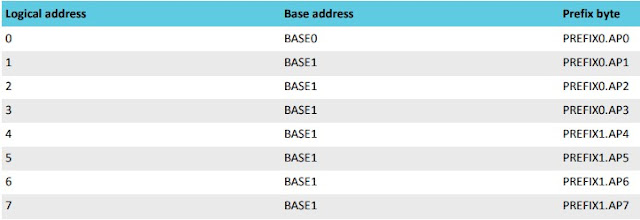
The radio works with logical pipes and defined radio addresses, just like the NRF24L01 and interaction with it is not as complicated as it could be. Getting the ESB protocol working has been a bit tougher than I originally thought it would be though.


As shown in the image above, pipe or logical address 0 can have a unique address, but pipes 1 through 7 must share a base address, very similar to the 24l01.


It seems that the radio must be disabled when switching between TX and RX states, it took me a while to figure this out programmatically, until I noticed this in the datasheet. 

Interestingly enough, the new, enhanced RF52840 does not implement any internal protocols, ESB must be entirely handled via software.

I have my nrf_to_nrf radio driver up and working now with many radio features. It allows users to use the API from the RF24 library to interact with the radio. I am having problems getting static payloads to transfer correctly, but simply enabling the dynamic payload feature enables the RF24 examples to function correctly, and it works with the rest of the RF24 communication stack, the different layers will need to be updated to accept the new library.

The nrf_to_nrf library only has a single-layer buffer at the moment, but it shouldn't be too difficult to implement a 3 layer FIFO like the nrf24s have. It would be helpful if I could drive the radio via IRQs but so far I haven't had any luck with IRQ handling. My cohort in RF24 programming is working on an alternative layer that uses code from the NRF52 SDK, but we might need to have IRQ handling running for that to be a viable option. We will see, the NRF24Network and higher layers have had adjustments made to allow the new library to work. Users can manually install from source until a new release is made to the libraries, which will update via the Arduino Library Manager.

Thanks again to Seeed Studio for sending me this device, new hardware is always fun to play with!

Thursday

RF24Audio Library Released:
 Wireless Digital Audio Streaming and more with Arduino and NRF24L01 modules


  Its been a little while in the making, but I am finally releasing my RF24Audio library. The library offers a number of features, mainly the ability to wirelessly stream realtime data or audio captured from an analog input to one or more other devices. 'Other devices' can include Arduinos, PCs, or any other device capable of reading the data stream.
  Since the library utilizes the core RF24 radio library, advanced usage and customization can be configured, and allows interaction with audio devices in a number of different ways. The TMRpcm audio library (WAV audio from SD card) has been updated to support the RF24Audio library as well, being capable of multicasting audio to a number of devices. A demonstration of this interaction is shown in the following video:


  The library is designed to be very easy to setup and configure, just connect a radio module, microphone and speaker. External buttons are optional, and are managed internally by the library. This can be disabled to allow further customization via keypads, etc. Users can also utilize the core RF24 library to interact with the audio devices in a number of ways, including capturing audio streams and feeding the data to a PC.

Features:
  • User friendly setup and configuration: For beginners too: Just connect a radio module, microphone, and speaker. The library handles the rest.
  • Recording and broadcasting of audio to multiple devices using only Arduino, RF24 modules and input/output devices (speaker,microphone)
  • Multicast: Enables broadcasting to all nodes, single nodes, or partial groups of nodes
  • External controls: Use external buttons or code to control audio streaming
  • Volume control: Use external buttons or code to control audio volume on receiving devices.
  • Remote control: Start recording remotely via radio commands (Currently cannot stop remote recording)
  • LED Indicator/Visualization: Indicates audio playback and amplitude.
  • Customization: Using the underlying RF24 core library allows custom interaction with audio devices running this library. Receive audio data and stream it to a PC over USB, create and broadcast computer generated audio in realtime, and more! See the USB_Audio example for more info.
  • Create additional node groups: Allows nodes to join private broadcast groups, and multicast only within their group as desired

Pin Assignments:
  • Speakers: Arduino Uno,Nano,etc: pins 9,10 Arduino Mega: 11,12 (Timer pins cannot be changed, but can use 1 pin and ground)
  • pin A0: Microphone/Input pin
  • pin A1: Transmission/Recording Start pin
  • pin A2: Volume Up
  • pin A3: Volume Down
  • pin A4: Trigger remote recording (Only working with dual devices)
  • Cannot be changed: LED Pin: Uno,Nano,etc: pin 6 Mega 2560: pin 13 (main LED pin)

Links:
Library Documentation
Download

Source Code:
RF24Audio Library
RF24 Radio Library
TMRpcm Audio Library


My Custom Zephyr + Arduino Build for Arduino Uno Q: Adding Zephyr Networking to the Mix

 My Custom Zephyr + Arduino Build for Arduino Uno Q: Adding Zephyr Networking to the Mix Using RF24Ethernet with native Zephyr networking  F...