Showing posts with label esb. Show all posts

Saturday

XIAO BLE Sense: More with nrf24L01+ communication

 XIAO BLE Sense: More with nrf24L01+ communication

Emulating the Enhanced Shock-Burst Protocol

So its been a little while since I received a BLE Sense board based on the NRF52840 from https://www.seeedstudio.com/ and man oh man it has taken up a lot of my time. This is one of my favorite hobbies, so creating a library for ESB communication with nrf24 modules has been quite a lot of fun!

The radio works with logical pipes and defined radio addresses, just like the NRF24L01 and interaction with it is not as complicated as it could be. Getting the ESB protocol working has been a bit tougher than I originally thought it would be though.
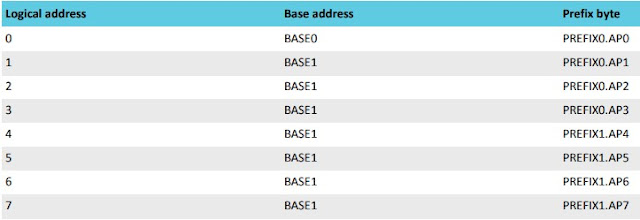

As shown in the image above, pipe or logical address 0 can have a unique address, but pipes 1 through 7 must share a base address, very similar to the 24l01.


It seems that the radio must be disabled when switching between TX and RX states, it took me a while to figure this out programmatically, until I noticed this in the datasheet. 

Interestingly enough, the new, enhanced RF52840 does not implement any internal protocols, ESB must be entirely handled via software.

I have my nrf_to_nrf radio driver up and working now with many radio features. It allows users to use the API from the RF24 library to interact with the radio. I am having problems getting static payloads to transfer correctly, but simply enabling the dynamic payload feature enables the RF24 examples to function correctly, and it works with the rest of the RF24 communication stack, the different layers will need to be updated to accept the new library.

The nrf_to_nrf library only has a single-layer buffer at the moment, but it shouldn't be too difficult to implement a 3 layer FIFO like the nrf24s have. It would be helpful if I could drive the radio via IRQs but so far I haven't had any luck with IRQ handling. My cohort in RF24 programming is working on an alternative layer that uses code from the NRF52 SDK, but we might need to have IRQ handling running for that to be a viable option. We will see, the NRF24Network and higher layers have had adjustments made to allow the new library to work. Users can manually install from source until a new release is made to the libraries, which will update via the Arduino Library Manager.

Thanks again to Seeed Studio for sending me this device, new hardware is always fun to play with!

Sunday

XIAO BLE SENSE: nrf52840 radio communication with nrf24L01+

XIAO BLE SENSE: nrf52840 radio communication with nrf24L01+

Establishing a communication layer using the RF24 API 

I recently received an XIAO BLE Sense board from https://www.seeedstudio.com/ based on the nrf52840 and have been playing around with it for a few days now. In that time I have been able to get audio recording working with my AutoAnalogAudio library, as well as establish basic radio communication with the nrf24l01+ modules. This thing is pretty sweet! It is very small, so I've been leaving it connected to the USB cable so I don't lose it, but its definitely a benefit.

One of the first things to know about this board is that it has a DFU functionality, so it switches ports while uploading, and goes back to the original port after uploading. This means that if you upload some code that crashes the device, you need to press the reset button twice quickly, and it will reaload into DFU mode on a different port, so you can re-upload some working code.

Secondly, if you get an error 'Property 'upload.tool.' is undefined' then you just need to select the correct upload port.

It also uses a USB-C connector, so make sure to have the correct cable handy.

Radio Communication:

To get radio communication working, I've written an Arduino library for the nrf52840 which can be found here: https://github.com/TMRh20/nrf_to_nrf It can be installed just like any other Arduino library.

The library includes one example for now, gettingStarted. To get this example working with the Arduino example from the RF24 library, the following parameters need to be set in the RF24 example:

  1. Call radio.enableDynamicPayloads();
As of this writing, the library only supports reception, and there is no Auto-Ack functionality yet. This is just a preliminary draft of the API.

So far I am very intrigued with this device and its capabilities. Hopefully it isn't too much to get transmission and auto-ack working, but we will see I guess.


Improvements to the nrf_to_nrf Library for Direct Radio Comms with nRF24, nRF52x & nRF54x Radios

 Improvements to the nrf_to_nrf Library for Direct Radio Comms with nRF24, nRF52x & nRF54x Radios Making use of the Radio Interrupt Hand...